29 Oct
What is IPTV UK? In simple terms, it is television delivered through an internet connection rather than through a traditional aerial, satellite dish or cable box, and Mystele IPTV UK helps British viewers understand this newer way of watching TV without the jargon.
If you have ever used BBC iPlayer, ITVX, Netflix, NOW, Prime Video or a catch-up app on a Smart TV, you have already used the basic idea behind internet TV. IPTV is part of the same wider shift: more people want flexible viewing, fewer wires and easier access across the devices they already own.
For viewers comparing services, devices and setup options, IPTV UK can feel confusing at first. The good news is that the fundamentals are straightforward once you know what to look for.
This guide explains IPTV in plain English for everyday British households. We will cover how it works, what devices you can use, what broadband speed helps, how UK TV Licence rules may apply, and the common mistakes to avoid before streaming.
Nothing here is designed to overwhelm you. Think of it as a calm, practical checklist before you start watching television through your broadband connection.
What Is IPTV UK?
IPTV stands for Internet Protocol Television. Put simply, it means TV content is sent to you over the internet instead of arriving through a rooftop aerial, satellite dish or traditional cable feed. The phrase what is IPTV UK usually refers to how this technology is used by viewers in Britain, with UK devices, UK broadband, UK apps and UK viewing rules in mind.
Traditional TV works by broadcasting the same signal out to many homes at once. Freeview uses an aerial. Freesat and Sky satellite use a dish. Cable TV uses a dedicated cable network. IPTV is different because your chosen programme, channel or stream is delivered over your home internet connection to a specific device, such as a Smart TV, Fire TV Stick, Android TV box, phone, tablet or laptop.
That difference brings a lot of flexibility. You are not limited to a single room. In many cases, you do not need extra drilling, cabling or a satellite engineer. If your internet connection is good and your device is suitable, IPTV can be simple to use once it is set up properly.
A lot of viewers hear the term IPTV and think it must be complicated. It is not really. At home, the experience can look much like opening an app, choosing something to watch, and pressing play. Behind the scenes, the stream is being delivered through your broadband rather than through broadcast television infrastructure.
IPTV can include several types of viewing:
- Live TV channels streamed over the internet
- Catch-up television from previous days
- Video on demand films and programmes
- Time-shifted viewing where supported
- Electronic programme guides on compatible apps
- Multi-device viewing depending on the service and setup
It is important to say that IPTV is a technology, not a guarantee of any particular channel, right or package. Channel availability, app features, picture quality and subscription terms vary from provider to provider. Before choosing any IPTV service, British viewers should check what is included, what is supported, and whether the provider explains things clearly.
How IPTV UK Streaming Works
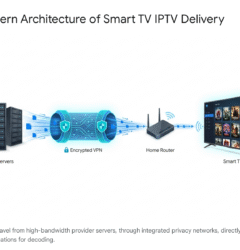
IPTV works by breaking video into small packets of data and sending those packets through the internet to your device. Your IPTV app or player receives the data, rebuilds it into a moving picture and sound, and displays it on screen. It sounds technical, but from a viewer’s point of view, it is very similar to using any modern streaming app.
When you select a stream, several things happen quickly:
- Your device asks for the selected content
- The service sends the stream through the internet
- Your router passes that stream to your TV or box
- The app decodes the video and audio
- Your screen plays the programme
- Your connection adjusts as the stream continues
The quality of the experience depends on a mixture of factors. Your broadband speed matters, but it is not the only thing. Router placement, Wi-Fi strength, device age, app quality and network congestion can all affect buffering or picture quality.
In most cases, wired Ethernet is more stable than Wi-Fi, especially for a main living room TV. However, many households successfully use IPTV over Wi-Fi if the router is nearby, the signal is strong and the broadband connection is not being overloaded by gaming, video calls, downloads and multiple 4K streams at the same time.
IPTV may be delivered through different formats. Some services use dedicated apps. Others use an IPTV player app where you sign in or add details provided by your subscription. Some devices have app stores, while others require manual installation. This is why it is worth checking device compatibility before paying for anything.
If you are completely new to the subject and want a shorter overview alongside this article, you may also find Mystele’s 2026 guide explaining IPTV for UK viewers useful for extra background.
The main point is this: IPTV is not magic and it is not a separate internet. It uses your normal home broadband connection. If your broadband is stable and your device is suitable, the experience can be smooth. If your broadband is weak or your device is struggling, even a good service can feel frustrating.
What British Viewers Should Check Before Streaming
Before you try IPTV in the UK, take a few minutes to check the basics. A small amount of preparation can prevent the most common problems, especially buffering, app confusion and unrealistic expectations.
Here is a practical checklist for British households:
- Broadband speed: Check your real speed near the TV, not just the speed advertised by your provider.
- Router position: A router hidden behind furniture or far from the TV can weaken Wi-Fi.
- Device support: Make sure your Smart TV, Fire TV Stick, Android TV or box supports the app you plan to use.
- TV Licence needs: Understand when live TV and BBC iPlayer require a UK TV Licence.
- Service clarity: Look for clear setup guidance, support and honest information.
- Viewing habits: Think about whether you mainly watch live sport, films, catch-up, family TV or international content.
Many viewers make the mistake of starting with the service before thinking about the home setup. In reality, your home network is part of the experience. A poor Wi-Fi signal can make any streaming service feel unreliable.
It also helps to think about who uses the TV. A single person streaming in one room may need a simpler setup than a busy family with children watching tablets, someone working from home on video calls, and another person gaming online. IPTV shares the same internet connection as everything else in your home.
British homes vary a lot. Some have full fibre broadband and excellent Wi-Fi coverage. Others still rely on older copper connections or have thick walls that weaken signals. If you live in a flat, you may also have interference from neighbouring Wi-Fi networks. These practical details often matter more than the brand of the streaming device.
It is also worth checking the difference between speed and stability. A speed test may show a high number for a few seconds, but streaming needs a steady connection over time. If your connection constantly drops or fluctuates, you may see freezing, lip-sync issues or buffering.
IPTV UK vs Freeview, Freesat, Sky and NOW
To understand IPTV clearly, it helps to compare it with familiar UK TV options. IPTV is not automatically “better” or “worse” than Freeview, Freesat, Sky, Virgin Media or streaming apps such as NOW. It is simply a different way of delivering TV.
Freeview uses a TV aerial and provides free-to-air broadcast channels where reception is available. It is simple, familiar and does not rely on broadband for the main broadcast signal. However, channel choice depends on your local transmitter and aerial setup.
Freesat uses a satellite dish and is useful for homes with poor aerial reception. Like Freeview, it focuses on free-to-air channels. It can be a strong option in rural areas where terrestrial reception is patchy.
Sky and Virgin Media are traditional pay-TV packages with their own equipment, subscriptions and terms. Sky also has internet-based products, and Virgin uses cable broadband infrastructure. Packages, channels and pricing vary, so viewers should always check the latest details directly with those providers.
NOW is a streaming service associated with Sky’s entertainment, cinema and sports passes, depending on the available memberships. It works through broadband on supported devices and is not the same as a full satellite package.
IPTV, in the broad sense, can be more flexible because it is internet delivered. Depending on the provider and app, it may work across a range of devices. But it also depends heavily on broadband quality and correct setup.
Here is a simple comparison:
- Freeview: aerial-based, no broadband needed for live broadcast
- Freesat: dish-based, useful where aerial reception is weak
- Traditional pay TV: packaged subscriptions with provider equipment
- NOW and streaming apps: app-based viewing over broadband
- IPTV services: internet-delivered TV through apps or players
- Catch-up apps: broadcaster apps such as BBC iPlayer, ITVX and Channel 4
The best option depends on your household. Some viewers keep Freeview for reliable free-to-air channels and add streaming apps for flexibility. Others prefer a more internet-first setup. Some sports fans compare Sky Sports, TNT Sports, NOW and other options carefully because sports rights change and availability depends on official agreements.
When comparing IPTV UK with mainstream platforms, avoid assuming that one service includes everything. No responsible guide should promise access to specific premium channels, sports events or films unless that availability is verified and properly licensed. Always check before subscribing.
Is IPTV Legal in the UK?
IPTV technology itself is legal. Many legitimate services use internet delivery, including broadcaster apps, subscription streaming platforms, hotel TV systems, business TV networks and modern pay-TV products. The legal question is not whether IPTV exists; it is whether the content is being provided with the correct rights and permissions.
For British viewers, this distinction matters. A service that clearly explains what it offers, operates transparently and respects content rights is very different from a suspicious service that makes unrealistic promises, hides its identity or claims to include every premium channel at a price that seems too good to be true.
Be cautious if a provider:
- Promises every paid sports channel for a tiny fee
- Provides no clear company or support information
- Uses aggressive “limited time only” pressure
- Refuses to explain device compatibility
- Has no terms, privacy policy or support process
- Encourages you to bypass normal app stores or security warnings without explanation
UK viewers should use their judgement and choose services that communicate clearly. If a claim looks unrealistic, it probably deserves closer scrutiny. The good news is that careful viewers can avoid many problems by asking sensible questions before paying.
It is also worth understanding that legality and safety are not the same thing as convenience. Just because a stream plays does not mean it is authorised, secure or reliable. Unauthorised services may disappear, change quality without warning, expose users to risky apps, or create problems around payment and privacy.
Mystele IPTV UK encourages viewers to be informed and cautious. This article does not provide legal advice, but it does recommend checking provider information, UK viewing rules and official guidance where needed. If in doubt about a specific service or content source, seek proper advice or use well-known official platforms.
UK TV Licence Rules for IPTV UK
TV Licence rules are a common source of confusion, especially because IPTV uses the internet. In the UK, the need for a TV Licence is not based only on whether you use an aerial or dish. It is based on what you watch and how you watch it.
At the time of writing, you generally need a UK TV Licence if you watch or record live TV on any channel or TV service, whether that is through an aerial, satellite, cable or internet stream. “Live TV” means watching a programme as it is being shown, including live streams through apps and websites.
You also need a TV Licence to use BBC iPlayer, whether you watch live, catch-up or on demand. This applies across devices, including Smart TVs, tablets, phones, laptops, games consoles and streaming sticks.
In many cases, you do not need a TV Licence simply to watch on-demand content from non-BBC services, such as many subscription film libraries, provided you are not watching live TV and not using BBC iPlayer. However, rules can change, and individual circumstances may differ, so it is sensible to check the official TV Licensing website for the latest position.
For everyday viewers, the simple version is:
- Watching live TV usually requires a TV Licence
- Recording live TV usually requires a TV Licence
- Using BBC iPlayer requires a TV Licence
- On-demand non-BBC viewing may not require one in many cases
- The device does not remove the requirement
- Check official guidance if you are unsure
This matters for IPTV because a live stream delivered through broadband can still be live TV. The fact that it is internet-based does not automatically make it licence-free. A lot of viewers misunderstand this point, so it is worth getting it right from the start.
If your household watches a mixture of live channels, BBC iPlayer, ITVX, Channel 4, Channel 5, sport, films and catch-up, take a moment to understand which parts of your viewing require a licence. It is much easier to sort this out before changing your TV setup than after.
Best Devices and Apps for IPTV UK
One reason IPTV has become popular is that it can work on many common household devices. You do not necessarily need a complicated setup. Many viewers already own something suitable.
Common IPTV devices in the UK include:
- Amazon Fire TV Stick and Fire TV Cube
- Android TV and Google TV devices
- Smart TVs from major brands
- Android TV boxes
- Phones and tablets
- Windows and Mac computers
A Fire TV Stick is popular because it is affordable, portable and easy to plug into an HDMI port. Android TV devices can offer more flexibility for apps. Smart TVs are convenient because everything is built in, but app availability varies by TV brand and model. Older Smart TVs may feel slow or may stop receiving app updates over time.
If you are using a Smart TV, it is worth checking which apps are available in your TV’s app store before committing to a service. Some TVs support a wide range of IPTV player apps, while others are more limited. If you want more practical help on that side, Mystele has a separate guide to choosing IPTV apps for Smart TV in the UK.
For most non-technical viewers, the best device is the one that is stable, easy to navigate and supported by the provider’s setup instructions. A very powerful box is not much use if the remote is confusing or the app crashes. Simple often wins.
When choosing a device, consider:
- Ease of use: Is the menu simple for everyone in the house?
- App support: Can you install the player or app you need?
- Updates: Does the device still receive software updates?
- Wi-Fi quality: Does it support your router’s Wi-Fi properly?
- Ethernet option: Can you use a wired connection if needed?
- Remote control: Is it comfortable and responsive?
Do not overlook the HDMI port and power supply. Some streaming sticks perform better when plugged into a proper wall adapter rather than a low-power USB port on the TV. Also, if the stick is tucked behind a wall-mounted TV, Wi-Fi reception may suffer. A short HDMI extender can sometimes help improve signal and reduce overheating.
Apps also matter. An IPTV player app is the software that displays the channels, guide and streams. Features vary widely. Some have cleaner layouts, better electronic programme guides, catch-up support where available, parental controls and favourites lists. Others are basic but reliable. The best choice depends on your service and device.
Common Mistakes to Avoid
Most IPTV frustrations are avoidable. The technology is not difficult, but small setup decisions can make a big difference. Here are the most common mistakes British viewers make when exploring IPTV UK for the first time.
1. Expecting broadband to fix everything. Faster broadband helps, but it does not guarantee perfect streaming. If your Wi-Fi is weak near the TV, upgrading your speed package may not solve the problem. Router position, interference and device quality still matter.
2. Choosing a service only by price. A cheap deal is not always good value. Clear support, realistic claims, stable apps and honest communication are often more important than saving a few pounds.
3. Ignoring TV Licence rules. Some viewers assume internet streaming is automatically exempt. It is not. Live TV and BBC iPlayer have specific UK Licence requirements, regardless of the device used.
4. Using an old or slow device. An ageing Smart TV or low-quality box can cause freezing, crashes and slow menus. Sometimes the IPTV service is blamed when the device is the weak point.
5. Overloading the home network. Streaming IPTV while several people are gaming, downloading and making video calls can cause buffering, especially on slower connections.
6. Not testing before relying on it. If you are planning to watch a big live event, do not set everything up five minutes before kick-off. Test your device, app, broadband and login in advance.
Here is a simple “avoid this” list:
- Do not buy based only on bold promises
- Do not ignore poor Wi-Fi signal
- Do not install unknown apps casually
- Do not forget parental settings
- Do not assume every device is supported
- Do not leave testing until a live event starts
A little preparation goes a long way. Set up favourites, test the guide, check the audio settings and make sure other family members know how to open the app. These small steps make IPTV feel more like normal TV and less like a technical experiment.
Another common mistake is not thinking about support. If something goes wrong, who do you contact? Is there a setup guide? Are there instructions for your exact device? A provider that explains things clearly is often easier to live with than one that leaves you guessing.
Troubleshooting IPTV UK Streaming Problems
If IPTV buffers, freezes or shows a black screen, do not panic. In most cases, the cause is something simple. Work through the basics before assuming the service is broken.
Start with your broadband. Run a speed test close to the TV if possible. If your phone gets a poor result in the same room, the TV device probably has poor Wi-Fi too. Move the router if you can, or consider a mesh Wi-Fi system, powerline adapter or Ethernet cable for the main TV.
Next, restart the chain. Turn off the TV device, router and app, then try again. Many streaming issues are caused by temporary glitches that clear after a reboot.
Try these checks:
- Restart the router and streaming device
- Check whether other apps are also buffering
- Move closer to the router or use Ethernet
- Clear the app cache if your device allows it
- Update the app and device software
- Test at a different time of day
If only one app has problems, the app settings or service may be involved. If every streaming app struggles, your broadband or home network is more likely to be the cause. If the picture works but sound does not, check audio output settings, HDMI connections and TV sound format options.
For Fire TV Stick users, storage can also matter. If the device is nearly full, apps may become sluggish. Uninstall unused apps and restart the stick. Overheating can also cause performance dips, particularly if the device is squeezed behind a warm TV with poor airflow.
For Smart TVs, older models may struggle with modern apps. If your TV menus are slow, adding a dedicated streaming stick can sometimes improve the experience without replacing the whole television.
If you contact support, describe the problem clearly. Instead of saying “it does not work”, mention the device, app, broadband type, whether Wi-Fi or Ethernet is used, when the issue started, and whether other streaming apps work. Good information helps support teams narrow things down quickly.
Remember that live streaming is more sensitive than ordinary on-demand viewing. A film app can buffer ahead quietly, while a live channel must arrive in real time. That is why live sport may reveal network weaknesses that you never notice when watching a box set.
Final Thoughts
So, what is IPTV UK? It is a modern way to watch television through your broadband connection, using apps and connected devices rather than relying only on an aerial, satellite dish or traditional cable box. For many British viewers, it offers flexibility, convenience and a more internet-first way of watching TV.
The good news is that you do not need to be technical to understand IPTV. You simply need to check the essentials: a stable broadband connection, a suitable device, a trustworthy service, realistic expectations and awareness of UK TV Licence rules. Once those basics are in place, IPTV can feel familiar very quickly.
As with any TV choice, take your time. Compare options, read setup guidance, avoid unrealistic claims and think about how your household actually watches television. If you want calm, practical help with IPTV setup and viewing choices, Mystele IPTV UK is here as a friendly place to start your streaming journey.
FAQ
What is IPTV UK in simple terms?
IPTV UK means television delivered through an internet connection for viewers in the United Kingdom. Instead of using only an aerial, satellite dish or cable box, you watch through an app or device connected to your broadband.
Do I need a TV Licence for IPTV in the UK?
You generally need a UK TV Licence if you watch or record live TV on any service or use BBC iPlayer. This applies whether you watch through an aerial, satellite, cable or internet stream. Check official TV Licensing guidance for the latest rules.
What broadband speed do I need for IPTV UK?
There is no single number that suits every home, but stable broadband is more important than headline speed. HD streaming usually needs a reliable connection, while 4K uses more bandwidth. Test the speed near your TV and improve Wi-Fi if needed.
Can I watch IPTV on a Smart TV?
Yes, many Smart TVs can run IPTV apps or player apps, but support depends on the TV brand, model and app store. If your TV is older or slow, a Fire TV Stick, Android TV or similar streaming device may be easier.
Is IPTV the same as Netflix or BBC iPlayer?
They are related because they all use internet streaming, but IPTV often refers to live TV, channel lists, catch-up and TV-style viewing through internet delivery. Netflix is mainly on-demand, while BBC iPlayer includes live, catch-up and BBC content under its own rules.